
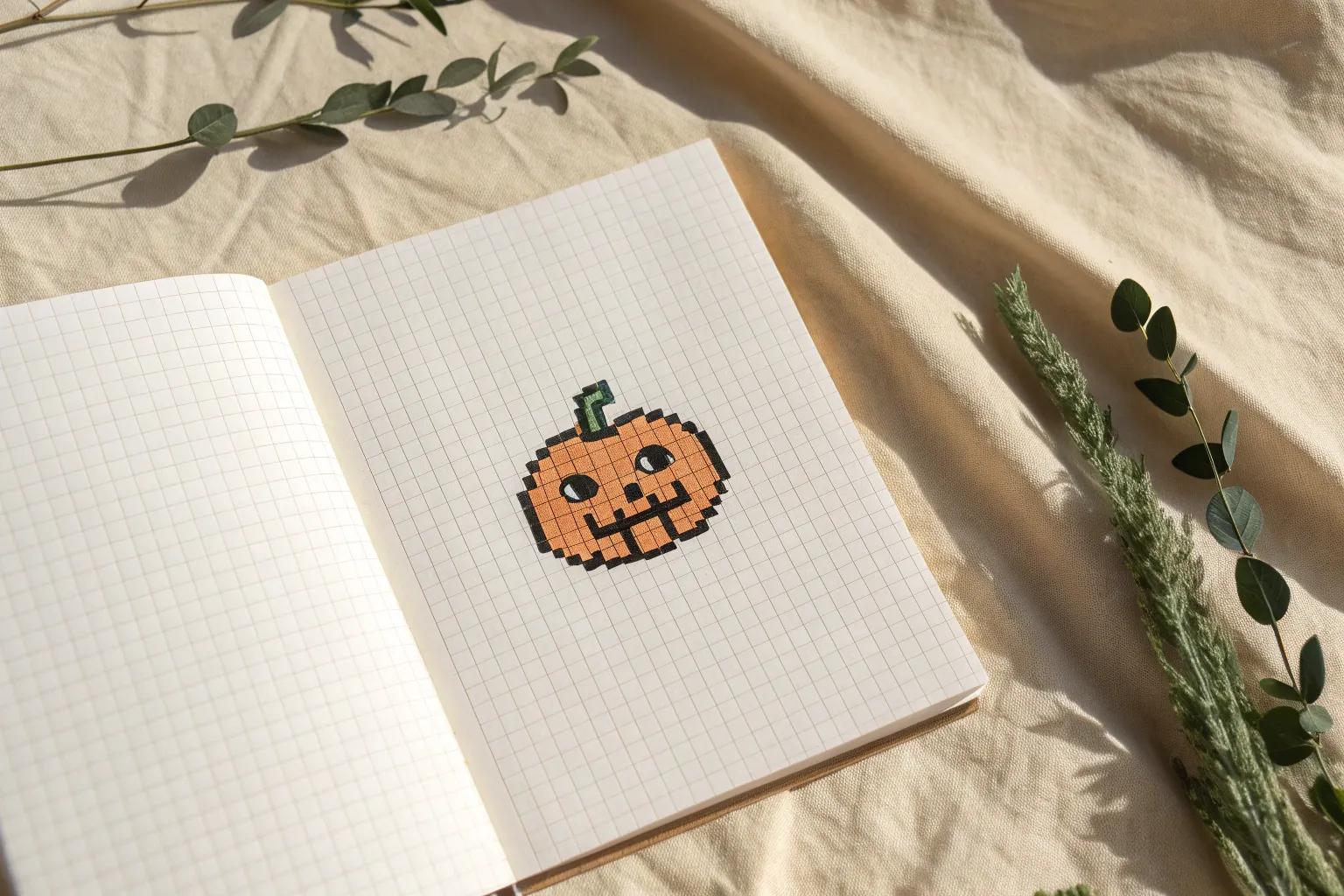
Whenever I want a quick creative win, I reach for small pixel art because those tiny squares make everything feel doable and satisfying. Let’s fill a page with mini pixel designs you can copy fast on a small grid and still get that “wow, I made that” feeling.
Tiny Hearts and Sparkles
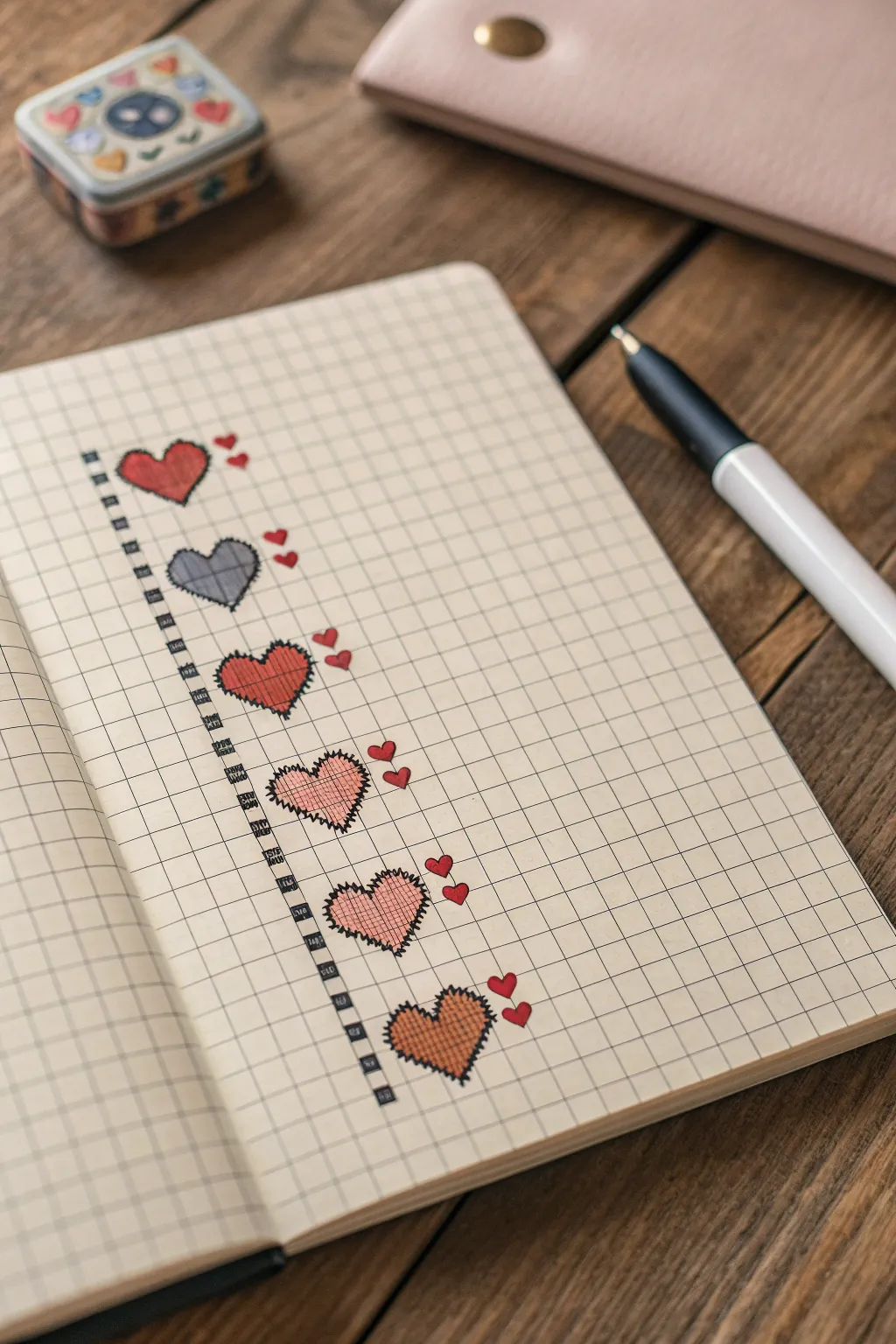
These charming hearts mimic the cozy texture of cross-stitch embroidery right on paper. Using grid lines as a guide, you’ll create a vertical sampler of six unique hearts that look like they’ve been sewn onto the page.
Step-by-Step Guide
Materials
- Grid or dot grid notebook (A5 size works well)
- Black fine-liner pen (0.3mm or 0.5mm)
- Colored pencils or fine markers (red, grey, pink, orange)
- Ruler (optional)
- Pencil and eraser for sketching
Step 1: Setting the Layout
-
Define the column:
Visualize a vertical column on the left side of your page. You will need a width of about 8 grid squares for the hearts themselves, leaving a margin on the far left. -
Mark the vertical spine:
Using your black fine-liner, draw a dashed vertical line running down the page, approximately 2 grid squares from the left edge. Make the dashes thick, like a bold stitch. -
Create spacing:
Plan for six hearts total. Leave about 2-3 grid squares of vertical space between where each heart will sit so the design doesn’t feel cramped.
Bleed-Through Check
Before starting, test your pen on a back page. If the ink ghosts through, glues two pages together or slip a piece of scrap paper behind your current sheet.
Step 2: Drawing the Base Hearts
-
Outline the first heart:
Starting near the top, lightly pencil in a classic pixel heart shape. It should be roughly 6 squares wide and 5 squares tall. -
Add the ‘stitched’ border:
Go over your pencil outline with the black fine-liner. Instead of straight lines, use jagged, zigzag strokes that cross over the grid lines to simulate thread stitches. -
Repeat down the page:
Draw the remaining five heart outlines below the first one, maintaining that jagged, stitched border style for each. Keep them aligned vertically. -
Erase pencil guides:
Once the ink is completely dry, gently erase any visible pencil marks to clean up your page.
Stitch Realism
Don’t make your border zigzags perfect! Varying the height and angle of the spikes makes the ’embroidery’ look more handmade and organic.
Step 3: Pattern and Color
-
Color the first heart:
Fill the top heart with a solid red color. Use vertical strokes to mimic the texture of fabric or thread. -
The grey plaid heart:
For the second heart, color it light grey. Once dry or set, draw thin perpendicular lines across it to create a simple plaid texture. -
The red textured heart:
On the third heart, fill it with red. Then, use a slightly darker shade or your pen to add a cross-hatch pattern over the top. -
The pink stitched heart:
Color the fourth heart a soft pink. Draw diagonal cross-hatching lines inside, changing angle halfway through to create a woven look. -
The geometric pink heart:
For the fifth heart, use a light pink base. Draw a grid pattern inside it that aligns with the notebook’s own grid lines. -
The fuzzy orange heart:
Fill the final bottom heart with orange. When drawing the black border for this one, make the spikes slightly longer to give it a ‘fuzzier’ appearance.
Step 4: Final Details
-
Add margin details:
Go back to that vertical dashed line on the far left. In the gaps between the dashes, draw tiny squares or ‘beads’ to connect the pattern. -
Draw the mini hearts:
To the right of the top heart, draw two tiny solid red hearts floating nearby. -
Continue the accents:
Add pairs of tiny red hearts next to the remaining large hearts. Vary their placement slightly—some higher, some lower—for a playful look. -
Connect the accents:
Draw very faint, short red lines connecting the tiny floating hearts to the main large hearts, as if they are floating away or attached by a string.
Now you have a column of textured hearts that adds a lovely handmade touch to your journal
Mini Mushrooms
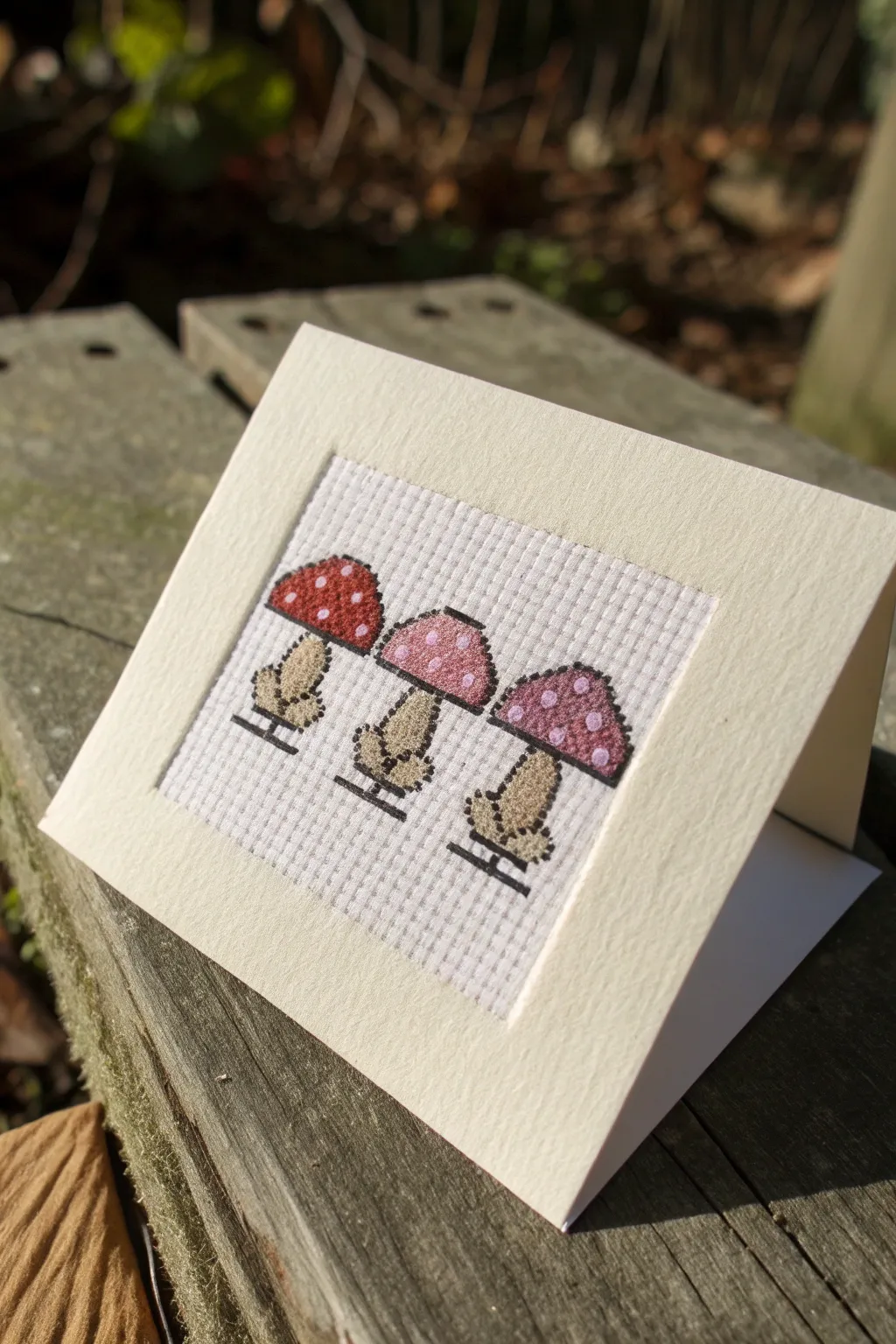
These charming pixel-style mushrooms bring a touch of woodland whimsy to stationery. Using simple cross-stitch techniques on an aperture card, this trio features three distinct cap colors for a delightful gradient effect.
Detailed Instructions
Materials
- Aperture card blank (cream or off-white) with envelope
- 14-count Aida cloth (white)
- Embroidery floss in three main colors: Red (e.g., DMC 347), Pink (e.g., DMC 3716), Purple (e.g., DMC 553)
- Embroidery floss in Beige/Light Brown for stems (e.g., DMC 840)
- Black embroidery floss for backstitching (e.g., DMC 310)
- White embroidery floss for spots (optional, or leave blank canvas)
- Tapestry needle (size 24 or 26)
- Embroidery scissors
- Double-sided tape or fabric glue stick
Step 1: Preparation & First Mushroom
-
Prepare the fabric:
Cut your Aida cloth slightly larger than the aperture window of your card. I usually leave about an inch margin on all sides to make mounting easier later. -
Find the center:
Fold your Aida cloth in half horizontally and vertically to find the absolute center point. This ensures your trio of mushrooms will be perfectly centered in the card window. -
Start the center mushroom:
Thread your needle with two strands of pink embroidery floss. Locate the center point of your fabric; this will correspond to the middle of the center mushroom’s cap. -
Stitch the pink cap:
Create the mushroom cap shape using cross stitches. The cap is roughly 7 stitches wide at the base and 3-4 stitches high, tapering at the top. Leave specific gaps unstitched where the ‘white spots’ will be, letting the white Aida show through. -
Stitch the center stem:
Switch to your beige thread (two strands). Stitch the stem directly below the cap. The stem should be thicker at the bottom (bulbous) and about 5-6 stitches high.
Uneven Tension?
If your crosses look lumpy, ensure you are always crossing the top stitch in the same direction (e.g., bottom-left to top-right) for a uniform finish.
Step 2: Completing the Trio
-
Position the left mushroom:
Count about 2-3 empty grid spaces to the left of your center mushroom’s cap. This spacing ensures they don’t look crowded. -
Stitch the red cap:
Using two strands of red floss, replicate the same cap pattern as the first one. Remember to skip stitches to create the white polka dots. -
Add the left stem:
Using the beige floss again, stitch the stem for the red mushroom. It should match the center one in shape and size. -
Position the right mushroom:
Count the same number of empty grid spaces (2-3) to the right of the center mushroom to maintain symmetry. -
Stitch the purple cap:
Thread your needle with two strands of purple floss and cross-stitch the final cap, maintaining the same spot pattern. -
Finish the stems:
Complete the cross-stitch portion by adding the final beige stem under the purple cap.
Step 3: Detailing & Mounting
-
Begin backstitching:
Rethread your needle with a single strand of black floss. This step is crucial for defining the pixel art look. -
Outline the caps:
Carefully backstitch around the perimeter of each colored cap. This sharpens the edges and makes the colors pop against the white background. -
Outline the stems:
Continue backstitching around the beige stems. I find this helps separate the stem from the cap clearly. -
Add the ground lines:
Stitch a straight horizontal line of black backstitch right at the base of each stem. Extend the line slightly past the width of the stem to ground the mushrooms. -
Secure the threads:
Flip your work over and weave any loose ends under existing stitches to secure them. Trim excess thread carefully. -
Position in card:
Open your aperture card. Place the stitched piece behind the window to check alignment. The design should float comfortably in the ample white space. -
Mount the artwork:
Apply double-sided tape around the edges of the window on the inside of the card. Press the Aida cloth firmly onto the tape, ensuring the fabric is taut and the mushrooms are straight. -
Seal the back:
If your aperture card has a flap to cover the back of the embroidery, glue or tape it down now to hide the back of your stitches.
Make It Glossy
Add French knots in white thread for the spots instead of leaving gaps, giving the mushrooms a lovely 3D texture.
Now your handmade card is ready to share with a nature-loving friend
Waving Penguin Buddy
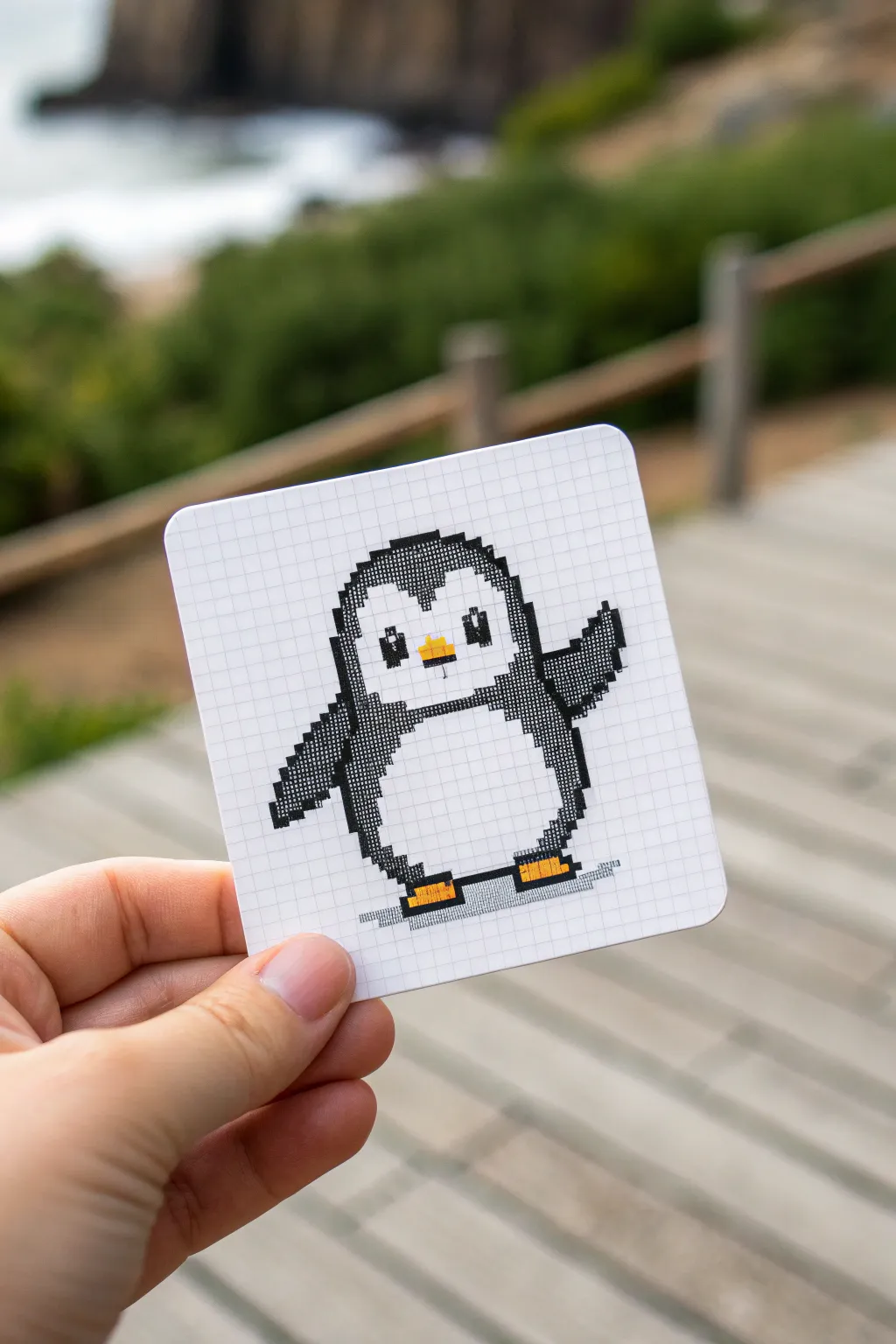
This friendly little penguin brings a smile to any space with its simple, cheerful wave. Designed on a neat grid, it captures the retro charm of 8-bit art using clean black outlines and bright pops of orange.
How-To Guide
Materials
- Small grid paper pad (approx. 5mm squares)
- Black felt-tip pen or fine liner (0.5mm – 0.8mm)
- Orange felt-tip pen or marker
- Light gray marker (for the shadow)
- Pencil (HB or lighter)
- Eraser
- Scissors
Step 1: Planning and Outlining
-
Define the grid area:
Visualize a grid area of approximately 20 squares wide by 20 squares tall. This gives you plenty of room to center your penguin without running off the edge. -
Sketch the body shape:
Using your pencil lightly, mark the bottom center of the penguin’s belly. Moving up, sketch a wide oval shape for the main torso, leaving space at the top for the head. -
Mark the eyes and beak:
Locate the center of the head area. Mark two squares for the eyes, leaving about three or four squares of space between them. Place a small rectangle in the center for the beak. -
Draft the flippers:
Sketch the left flipper hanging down by the side. For the right flipper, draw it angled upwards in a waving motion. -
Refine the pixel edges:
Go over your rough organic sketch and ‘pixelize’ it. Instead of curves, use stair-step patterns on the grid lines to create the blocky pixel art look. -
Outline the head:
Start defining the black ‘helmet’ of feathers on the head using your pencil, ensuring you have the little widow’s peak in the center of the forehead.
Clean Lines Pro Tip
Outline the inner edge of each pixel square first before filling the center. This creates a barrier and prevents the ink from bleeding outside the grid lines.
Step 2: Inking the Pixels
-
Start filling the black outlines:
Take your black felt-tip pen. Begin filling in the squares that form the outer boundary of the penguin. Using a “x” motion or small strokes inside each square keeps the ink even. -
Fill the dark body areas:
Color in the dark sections of the flippers and the sides of the body. Be careful to leave the large central belly area white. -
Detail the face:
Color in the black areas around the eyes, being extremely careful not to color over the white glint in the pupils—this spark of life is crucial. -
Create the eyes:
Fill in the eyes with solid black, leaving one tiny raw paper square in the upper corner of each eye for a highlight. -
Add the beak color:
Switch to your orange marker. Fill in the small rectangular beak area in the center of the face. -
Color the feet:
At the bottom of the body, color two wide, flat shapes in orange for the feet. Keep them separated by a few white squares. -
Erase pencil guides:
Once the ink is completely dry—I usually give it a full minute just to be safe—gently erase any visible pencil marks underneath.
Step 3: Finishing Touches
-
Add the ground shadow:
Using the light gray marker, draw a thin horizontal line of squares beneath the feet to ground the character so it isn’t floating. -
Refine edges:
Check your black squares. If any look patchy, do a second pass with the pen to ensure a solid, crisp black color. -
Clean up the card:
If you are working on a larger sheet, cut out the grid paper into a neat square with rounded corners for that finished ‘card’ look shown in the photo.
Level Up: Accessories
Give your penguin personality! Add a red pixel bow tie, a blue winter scarf, or even a tiny pixelated fish in its waving hand.
Now you have an adorable pixel companion ready to greet anyone who sees it
Simple Checker and Stripe Patterns
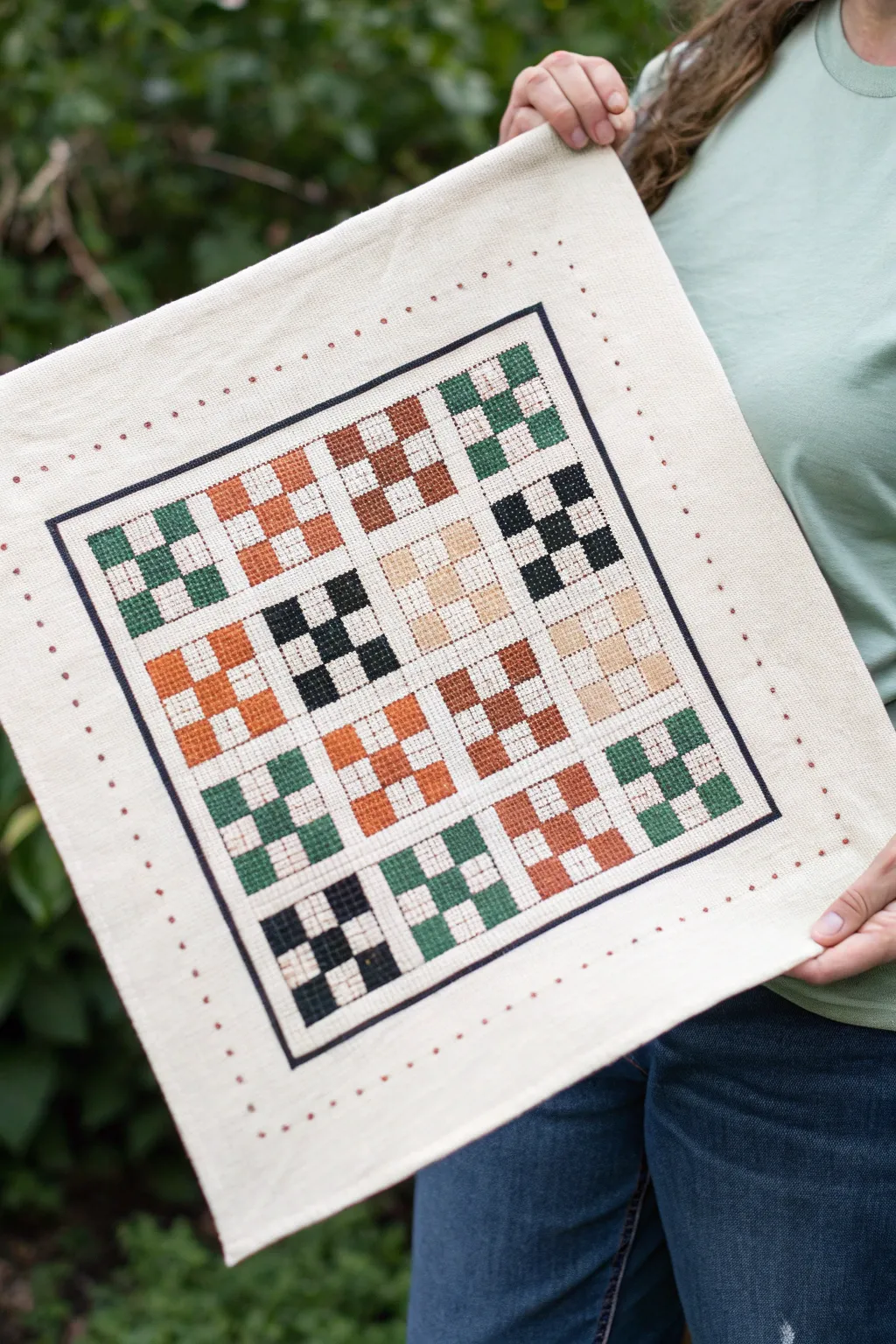
This charming project combines the simplicity of pixel art with the tactile warmth of needlework. Featuring a grid of sixteen 3×3 checkerboard blocks in earthy greens, rusts, and browns, it creates a cozy, quilt-like aesthetic on a sturdy canvas.
Step-by-Step
Materials
- Aida cloth (14-count or 11-count off-white/cream cotton)
- Embroidery floss in six earthy tones: Hunter Green, Sage Green, Rust Orange, Chocolate Brown, Tan/Beige, and Charcoal/Black
- Tapestry needle (size 24 or 26)
- Embroidery hoop (large enough to work comfortably)
- Small embroidery scissors
- Fabric marking pen or pencil (water-soluble)
- Ruler
Step 1: Planning and Preparation
-
Measure and cut fabric:
Begin by cutting your Aida cloth to size. You’ll want a square that is at least 16×16 inches to allow ample room for the border and mounting margins. -
Find the center:
Fold your fabric in half horizontally and then vertically to find the exact center point. Mark this lightly with your fabric pen; this ensures your grid stays perfectly centered. -
Grid the layout:
Using your ruler and marking pen, lightly sketch out the main 4×4 grid. Each of the 16 large squares needs to accommodate a uniform number of stitches—visualize a 3×3 pixel arrangement within each large square. -
Select your palette:
Organize your embroidery floss. Separate your skeins into color groups to ensure you have a balanced distribution of light and dark earthy tones before you start stitching.
Tension Pro-Tip
Keep your thread tension consistent but slightly loose. If pixels look distorted or the fabric grid warps, you are likely pulling the floss too tight on the return stitch.
Step 2: Stitching the Blocks
-
Start the first block:
Thread your needle with a dark charcoal floss. Choose the center-left block to begin. Create a 3×3 checkerboard pattern using full cross-stitches. Stitch five dark squares and leave four distinct squares unstitched (showing the cream fabric). -
Create the 3×3 pattern:
For each ‘pixel’ in the checkerboard, I prefer to use a 4×4 thread count square on the Aida cloth to make the pixels chunky and distinct. Ensure your top stitches all lie in the same direction for a neat finish. -
Work in rows:
Move to the next block in the row. Switch to a contrasting color, like a light tan or beige. Stitch the same 3×3 checkerboard pattern, maintaining consistent spacing between this block and the previous charcoal one. -
Alternate colors:
Continue across the grid, alternating your colors so no two identical colors touch directly. Use rust orange, sage green, and hunter green to create a scattered, patchwork effect. -
Maintain spacing:
Keep a consistent negative space grid between each of the 16 checkerboard blocks. This ‘gutter’ acts like the sashing on a quilt, separating the pixelated patches. -
Fill the grid:
Systematically fill in all 16 distinct blocks. Check your tension occasionally; if you pull too tight, the fabric will pucker. The pixels should lay flat against the cloth.
Step 3: Adding Borders and Details
-
Stitch the inner border:
Once the checkerboard blocks are done, thread your needle with the darkest charcoal thread. Stitch a solid single line of cross-stitches that frames the entire 4×4 grid, leaving a small margin of white space around the blocks. -
Mark the outer border:
Measure about 1.5 to 2 inches outward from your stitched frame. Using your fabric pen, mark small dots at even intervals to guide the decorative outer border. -
French knot detail:
Using a rust or brown thread, create small French knots at the marked intervals along the outer perimeter. These act as delicate polka dots that soften the hard edges of the pixel art. -
Clean up the back:
Flip your work over and secure all loose thread tails by weaving them under existing stitches. Trim any excess thread carefully so nothing shows through the front. -
Wash and press:
Gently rinse the fabric in cool water to remove your marking pen lines. Lay it flat on a clean towel to dry. Once dry, press it from the back with a warm iron to make the pixels pop.
Level Up: Texture
For a richer texture, swap the light-colored empty squares with a cream-colored thread stitch. It adds a subtle 3D ‘pop’ rather than just leaving the bare fabric exposed.
Frame your finished pixel patchwork or sew it into a throw pillow cover to add a touch of handcrafted charm to your living space

PENCIL GUIDE
Understanding Pencil Grades from H to B
From first sketch to finished drawing — learn pencil grades, line control, and shading techniques.
Explore the Full Guide
Seasonal Mini Icon Sets
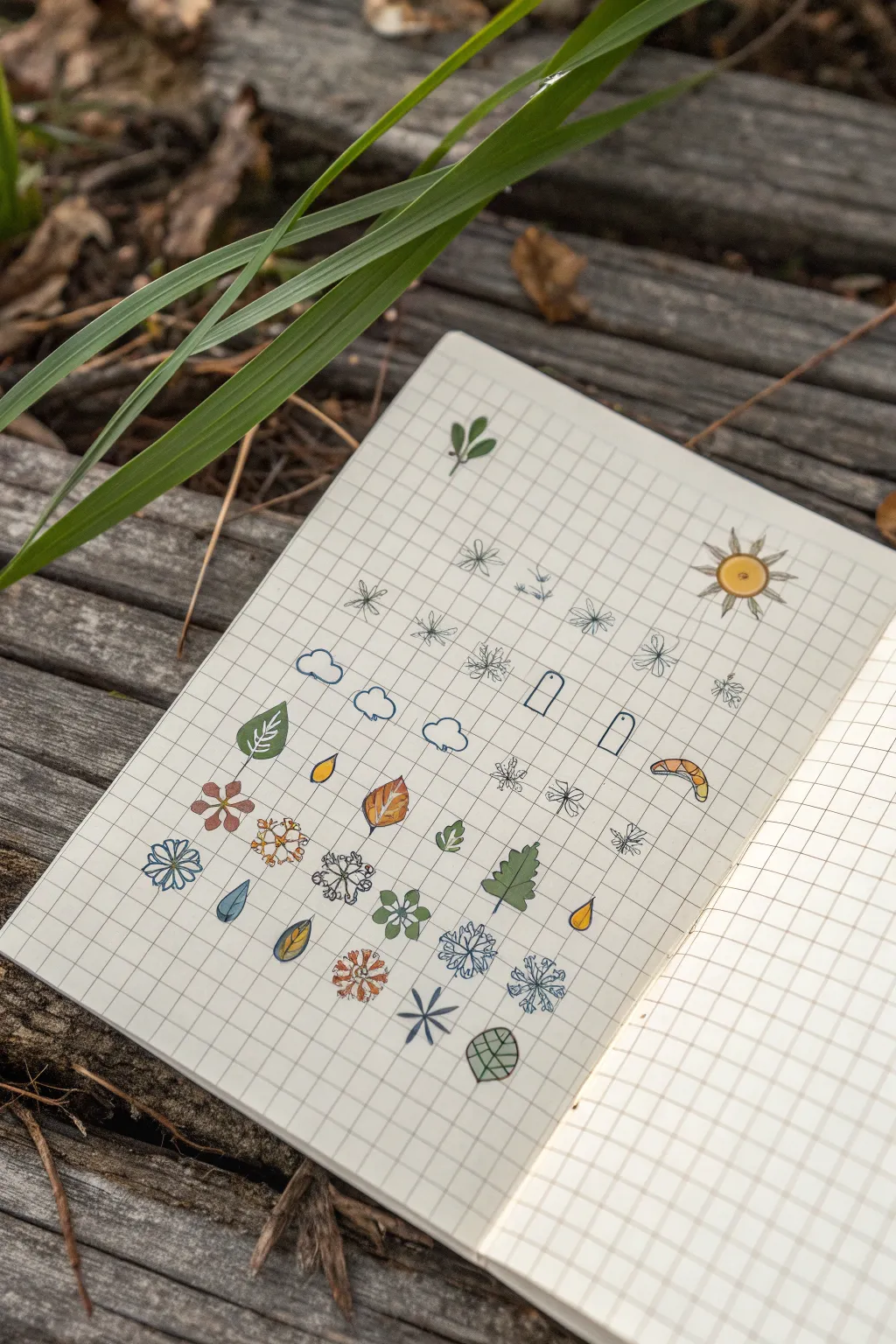
Capture the essence of the changing seasons with this charming collection of tiny, grid-based illustrations. Using graph paper as your guide, you will create a neat array of botanical and weather-themed icons that are perfect for bullet journaling or decorating planners.
How-To Guide
Materials
- Grid or graph paper notebook (creamy off-white paper looks best)
- Fine-liner pens (black, 0.1mm and 0.3mm)
- Colored pencils or fine-tip markers (muted earth tones: greens, browns, mustard yellow, dusty blue)
- Pencil and eraser (for sketching)
- Ruler (optional, if you need help with spacing)
Step 1: Setting the Layout
-
Prepare your canvas:
Open your notebook to a fresh page. Ensure you have good lighting to see the faint grid lines clearly. The grid squares will act as the ‘pixels’ or boundaries for your mini drawings. -
Plan the spacing:
Visualize a layout where icons are separated by at least one or two empty grid squares. You don’t need to draw boxes, but mentally assign a 2×2 or 3×3 grid area for each small icon to keep them uniform.
Smudge Prevention
Place a scrap piece of paper under your drawing hand. This acts as a shield, preventing oils from your skin from warping the paper and stopping your hand from smearing fresh ink.
Step 2: Drawing the Weather Elements
-
Sketch the sun:
Start near the top right. Draw a small circle filling one grid square. Add radiating spikes for rays triangles for a stylized look. Later, you’ll color the center a warm mustard yellow. -
Draft the clouds:
On a new row, draw simple outline clouds. Use the grid lines to flatten the bottom of the cloud (making it straight) and use semi-circles for the fluffy tops. Create a few variations: single clouds and double clouds. -
Add raindrops:
Below the clouds or randomly spaced, draw simple teardrop shapes. Keep them contained within a single grid square height to maintain the miniature scale. -
Create tiny snowflakes:
Using a 0.1mm pen, draw asterisks (*) or crossed lines. Add tiny < or v shapes at the ends of the lines to elaborate them into snowflakes. Keep the lines crisp and delicate.
Go Seasonal
Dedicate a full page to just one season. Create a ‘Summer’ page with tiny bright fruits, ice creams, and seashells, or a ‘Fall’ page with pumpkins, scarves, and darker foliage.
Step 3: Botanical Doodles
-
Draw basic leaves:
Sketch oval or almond shapes for basic leaves. Draw a central vein down the middle. For grid-style precision, start the base of the leaf at a grid intersection. -
Create an oak leaf:
For the lobed leaf (like the green one near the bottom), draw a central stem first. Then, create wavy, rounded lobes on either side, trying to keep it roughly symmetrical within a 2×3 grid block. -
Outline the flowers:
Draw small five-petaled flowers. Start with a tiny center dot and loop the petals around it. I sometimes like to alternate between rounded petals and slightly pointed ones for variety. -
Add seasonal berries or nuts:
Sketch small circles or oval shapes to represent acorns or berries. For an acorn, draw a small ‘cap’ on top with cross-hatching texture.
Step 4: Adding Color & Detail
-
Select your palette:
Choose a limited color palette to maintain a cohesive, nature-study aesthetic. Muted olive greens, rusty oranges, and slate blues work perfectly here. -
Color the leaves:
Gently fill in your leaf shapes with olive or forest green. Press lightly to keep the texture soft and allow the grid paper grain to show through slightly. -
Warm up the autumn elements:
Use mustard yellow for the sun and the small teardrop shapes (if they are falling leaves). Use rust or brown for the acorn and any dried leaf motifs. -
Cool down the winter icons:
Take a light blue pencil or marker and trace over the snowflake lines or fill in the raindrops. If using colored pencil, sharpen it to a very fine point first. -
Final inking:
Go over any pencil outlines with your fine-liner pen if you haven’t already. Ensure the ink is fully dry before erasing any stray pencil sketch marks to avoid smearing.
Close your notebook knowing you have a personalized reference library of tiny doodles ready for your next journal spread
Have a question or want to share your own experience? I'd love to hear from you in the comments below!